
Site-specific inductions
Introduce the site.
Keep the completion.
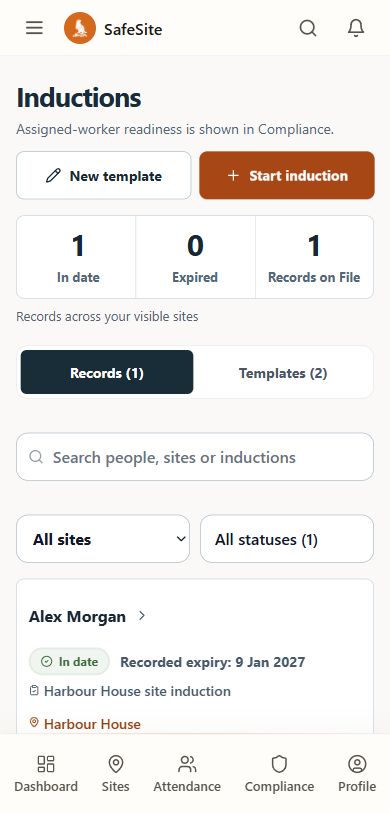
Publish the site rules, hazards and emergency arrangements. Capture the knowledge check and signed completion, then recognise a valid completion on return visits.
Prepared for each site
Publish the content and emergency details people need.
Knowledge and completion
A graded check, signature and recorded expiry.
Valid return visits
Recognise current site completion for workers and visitors.
The working sequence
A clear first visit. A simpler return.
Managers publish the induction; each person completes the site’s relevant steps.
Publish
Prepare site-specific content and publish the checked version.
Site contentLearn and check
Present the induction and grade the knowledge check.
Knowledge checkSign and retain
Capture completion with the person, content version and expiry.
Completion recordRecognise a return
Reuse a valid completion for the same site rather than repeat it each shift.
Current completion
Record contextValidity, versions and device support
Validity, versions and device support
Publishing replacement content creates a new version. Valid prior completion evidence remains valid until expiry.
Camera and cross-device QR behaviour depends on supported devices, browser permissions and operating conditions. Completion records the workflow step and does not prove identity.
In day-to-day use
Questions about site inductions.
How the steps and records fit together for your team.
What does SafeSite keep when someone completes an induction?
SafeSite grades the knowledge check, captures the signed completion and retains the link to the published induction version. Workers and contractors complete their own assigned-site steps, while the record shows which content version the completion belongs to.
See worker and contractor accessDoes a replacement induction erase earlier completions?
No. Publishing replacement induction content creates a new version. Valid prior completion evidence remains valid until expiry and keeps its link to the earlier published content. You can discuss replacement versions and completion expiry together during a walkthrough.
Check versions in the worker experienceIs completing an induction the same as checking in to site?
They are separate records. An induction completion relates to the published content and knowledge check. Attendance records the check-in and check-out for an assigned site. SafeSite connects both within the site workflow so the team can review the relevant completion and attendance records.
See how site check-ins workSee SafeSite with your team